 Best solutions for Password Recovery and Data Recovery
Best solutions for Password Recovery and Data Recovery
Best solutions for Password Recovery and Data RecoveryForgot Windows Vista password and have no installation CD or reset disk, how to do? What a forgotful personal you are. A Vista password reset disk is free and easy to use, but many people still forgot to create it. Take it easy, we can use a Vista password reset tool to help reset it offline.
Solution 1: Reset Vista Password with Ophcrack
Ophcrack, a free Windows password cracker that can be used to crack Windows 7/Vista/XP password via Brute Force Attack. It is useful for people who forgot Vista password and want to recover the it. The shortage is that this free program just can crack a password which made up of less than 5 characters. And need some time to crack it. If your password is complex, the cracking may take long time. Let's see how to use:
1. Download the right Ophcrack Live CD, extract the ISO image.
2. Use ISO Burner to burn the Ophcrack ISO image to a bootable CD.
3. Insert the CD to your locked computer and set the computer to boot from CD.
4. Ophcrack program run automatically and crack all user accounts password.
5. Remove the CD and retart your computer, then login Vista with the recovered password.
Solution 2: Reset Forgotten Vista Password with Third Party Software
Reset Vista password with "Asunsoft Windows Password Reset Professional". This is one of the most popular Windows password reset software which supports Windows 7/Vista/XP/2000 password reset. It similar to Ophcrack but a key feature is that it can instantly reset any lost Windows password. See how to do:
1. Download and install Windows Password Reset Professional on anther computer. Run the software to create a Vista password reset disk with CD/DVD or USB. Just burn itself to a bootable CD/DVD or USB.
2. Plug in the newly password reset disk to your locked computer, boot the computer from CD/DVD or USB.
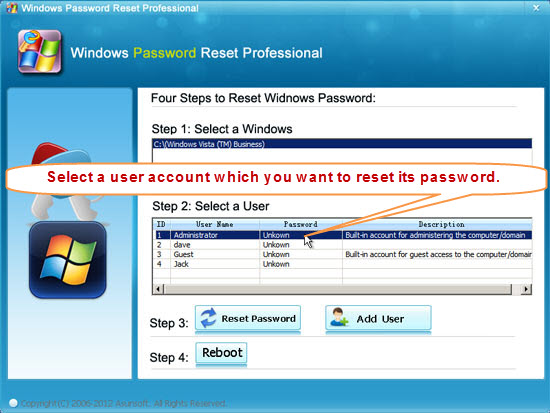
3. After booting from CD/DVD or USB, "Windows Password Reset Professional' will start automatically.
4. Click an user account, all Vista user accounts will be displayed in a list, click "Reset Password". Remove the Vista password reset disk and reboot computer. Then you can login Vista without password.
Click here to see step-by-step guide.


Windows Password Reset Professional
Only $27.95


Video Demo: