 Best solutions for Password Recovery and Data Recovery
Best solutions for Password Recovery and Data Recovery
Best solutions for Password Recovery and Data RecoveryYou may have faced the issue of losing the SQL Server SA password. Perhaps you followed the security best-practice of removing the builtin\Administrators from the sysadmin server role, and no one you can find is in the sysadmin role. At this point you may think that your only options are to reinstall SQL Server and attach the databases. In fact, Asunsoft SQL Password Recovery can help you reset SA and other user passwords of Microsoft SQL Server 2005, 2008 and other versions.
Now I will show you how to use SQL Password Recovery to reset SQL SA password without data damaged, it is easy.
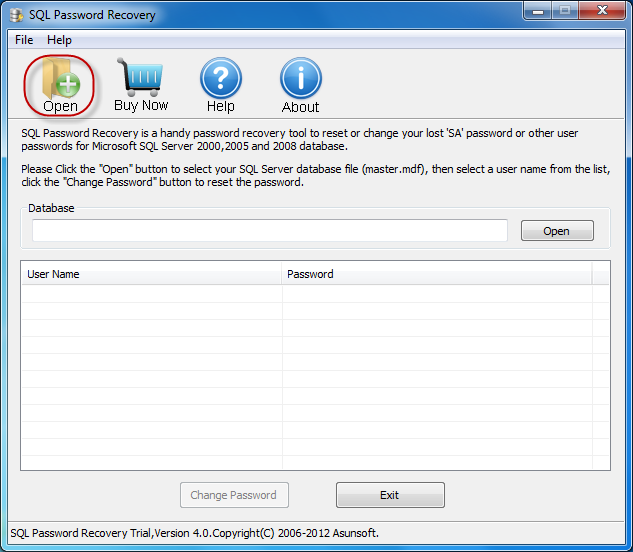
Step1. Download SQL Password Recovery and install it on your Computer. Click "Open" button, browse for your SQL Server master database file (master.mdf). Typically it is located in this folder: C:\Program Files\Microsoft SQL Server\MSSQL.1\MSSQL\Data
Step2. Click an user account from list, click the "Change Password" button. Here we take SA password reset for example.
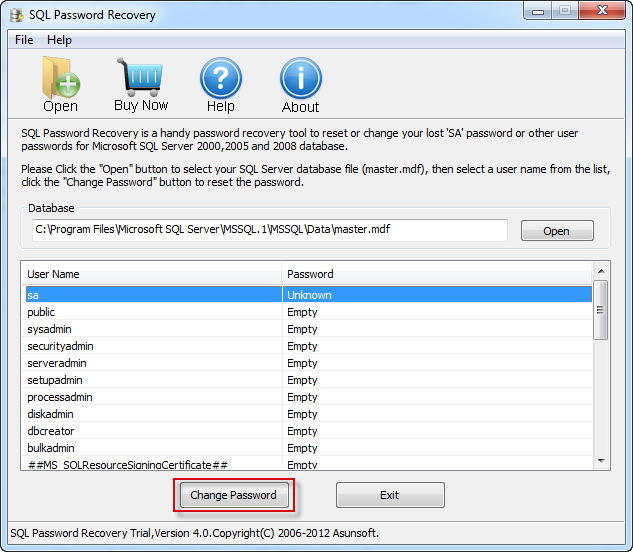
Note: There are two kinds of MS SQL Server password will displayed on the table: Unknow and Empity.
Unknown means you have a password for the user account.
Empty means the user account doesn't have a password protected, you can login without password.
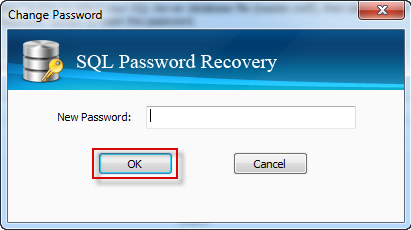
Step 3. When a dialog pops up, type a new password and click the "OK" button to change SQL SA password. Then you can login your SQL Server with new password.