 Best solutions for Password Recovery and Data Recovery
Best solutions for Password Recovery and Data Recovery
Best solutions for Password Recovery and Data RecoveryForgot login password on my laptop? Don't worry, it is a common problem. More and more people meet the problem that they forgot their laptop Windows 7 password. Here are some questions I have seen on other Q&A website:
1. I forgot my laptop password Windows 7, What do I do?
2. I forgot my password for windows 7 for my laptop and a reset disc was not created. How can I recover the password or created a new one?
3. How do you unlock a laptop if password is forgot? I'm using Windows 7.
In fact, to reset a laptop Windows 7 password is not so troublesome now. You can reset a forgotten Windows 7 password by using a installation disk, a user account with admin privileges, or easily reset it with "Asunsoft Windows Password Reset Professional" no matter what brand of laptop you are using, dell/hp/toshiba/acer/samsung or other. The third method can be used to reset any lost laptop password for Windows 7/Vista/XP/2008/2003/2000.
Solution One: Reset Windows 7 Password with Installation Disk on My Laptop
When you buy a new laptop, the supplier may provide a Windows 7 installation to you. I you still have it in hand, you can use it to reset laptop password Windows 7.
1. Insert the installation disk to your locked computer, restart. When following interface appears. Cllick“Repair your computer”.

2. A dialog with several options pops up, click Command Prompt.
3. When a Command Prompt black screen appears, type "copy c:\windows\system32\sethc.exe" and press Enter. Then type "copy c:\windows\system32\cmd.exe c:\windows\system32\sethc.exe" afterwards press Enter key.
4. Restart your computer. On the login screen, tap Shift key five times and you'll see a command prompt screen in administrator mode. OK, type "net user UserName NewPassword" (replace the UserName and UserPassword with which you wanna) and press Enter key. The user password will be replaced with new one. Close the window and then you can login your laptop Windows 7 with new password.
Solution Two: Login Another User Account to Reset Windows 7/VIsta/XP Laptop Password
If you still have another user account which has admin privileges. It is so easy to reset a forgotten Windows 7 password.
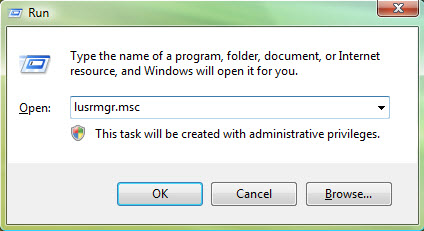
1. Click on Start, type lusrmgr.msc in the Search box or Run box, click OK.
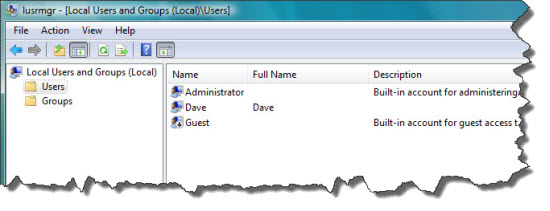
Local users and Groups dialog appears, open the Users folder. Right-click an user account you want to reset its password and select "set password", type a new password twice and click OK. But note that this way may lead to lose some personal encrypt files of that user.
Solution Three: Reset Laptop Windows 7/Vista/XP Passowrd with "WIndows Password Reset Professional"
This is a universal Windows password recovery program that can reset lost Windows password on any laptop or desktop. If you want to find a quick and safe way to reset your laptop Windows 7 password, this is a better way.
1. Download the software and install it on another PC.
2. Create a password recovery disk with CD/DVD or USB by burning. This software can burn itself. Select a burning type, select your drive name and click Begin burning button in second step.
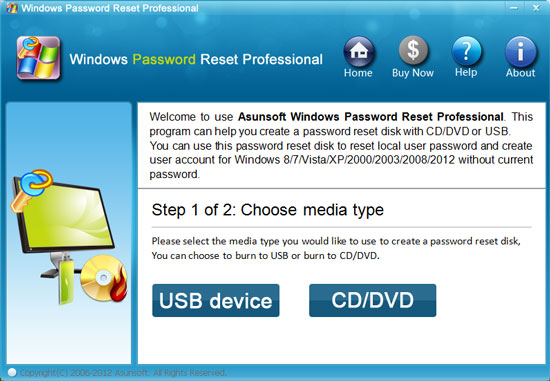
3. Insert the disk to your locked laptop, boot the laptop from CD or USB.
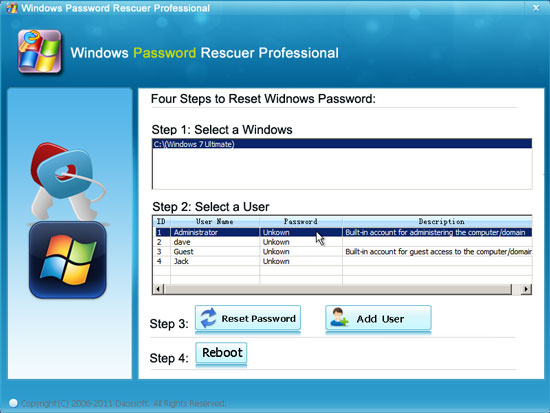
4. When the following interface appears, you can reset any user password easily. Only a few clicks. Click a user account and click "Reset Password", click Reboot. Then you can login Windows 7 without password. More details: How to use Windows Password Reset Professional


Windows Password Reset Professional

Only $27.95


Video Demo: