 Best solutions for Password Recovery and Data Recovery
Best solutions for Password Recovery and Data Recovery
Best solutions for Password Recovery and Data RecoveryLost administrator password and cannot login Windows Operating system? Take it easy, this article describes two simple solutions to help you get around Windows administrator password without knowing it which fit for Windows 8, 7, VIsta, XP, Server 2008(r2).
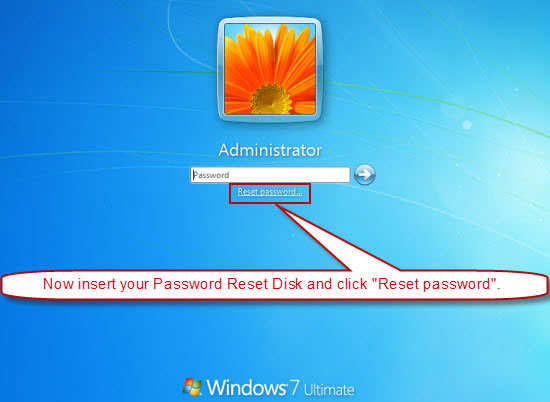
In almost all Windows operating system, people can create a Windows password reset disk for free to prevent user account password lost. It is easy to use and safe for changing user password. You can open control panel - user accounts - your user - create password reset disk, to create one for your user account. When you forgot the password, follow these steps:
1. Comnonly, when you login failed, system will show you a link, reset password. Click it.
2. A Password Reset Wizard will pops up, then insert your password reset disk and click next.
3. Select the Drive name from pull-down list and click Next.
4. Type a new password and confirm. Type a password hint or not, click Next.
5. Completing the password reset wizard, click Finish.
If you forgot Windows administrator/user password and have no reset disk, you can use a third party password recovery tool to recover it without losing files.
Option One: Ophcrack, one of the most popular Windows password recovery tool based on rainbow tables. When you lost Windows administrator password, this is a good choice to get around it. But many people failed to recover Windows password for its large ISO
image.
Advantage: Free of charge, can get back any user account password on Windows 7/Vista/XP
Disadvantage: Just can recover the password less than 6 characters. Large size of ISO file. Time consuming on recovering a complex password.
Option Two: Asunsoft Windows Password Reset, an universal Windows password recovery software.which can be used to get around Windows 7/Vista/XP/2008/2003/2000 admin and user password by removing/reseting their password. It is a better way to recover lost password without losing any files.
Advantage: Easily to use, works perfectly with any Windows operating system. Instantly get around any user account password regardless of how long and complex the password is. 100% success rate.
Disadvantage: Need install on a second PC and a bootable CD/DVD or USB flash drive. Free trial version only display all user accounts of the computer but not reset their password.