 Best solutions for Password Recovery and Data Recovery
Best solutions for Password Recovery and Data Recovery
Best solutions for Password Recovery and Data RecoveryThis article describes two efficient ways to help you break Windows 7 password when you lost/forgot it. Note that our target is to back into Windows 7 without losing data or changing any settings. How to break Windows 7 password without lose anything?
Solution One: Break Windows 7 Administrator Password with "Asunsoft Windows 7 Password Reset"
Asunsoft Windows 7 Password Reset(AW7PR) is a professional Windows 7 password recovery tool which can easily remove all user account password in Windows 7. So we can use it to break Windows 7 password by simply removing it. This is the fastest way to help you solve your password problem.
Step 1: Download "AW7PR' on another computer which you can access as administrator.
Step 2: Create a bootable disk by burning it to a CD/DVD or USB flash drive.
Install AW7PR and run it.
1. Plug in a writable USB drive to your computer. Choose USB Device
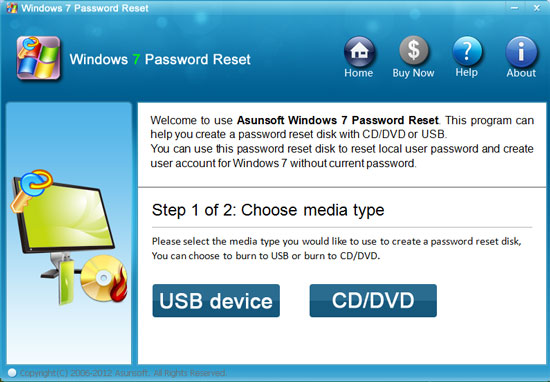
2. Select the drive name from pull-down list. Hit Begin Burning button to start burning.
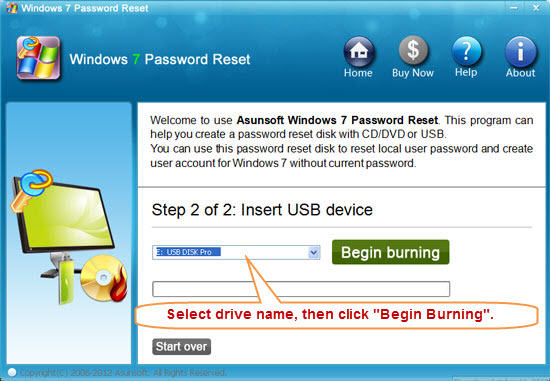
Step 3: Boot your locked computer from the bootable disk.
How to do: How to boot from USB drive.
Step 4: Break Windows 7 Administrator Password instantly.
When the computer boot from USB, AW7PR will run automatically.
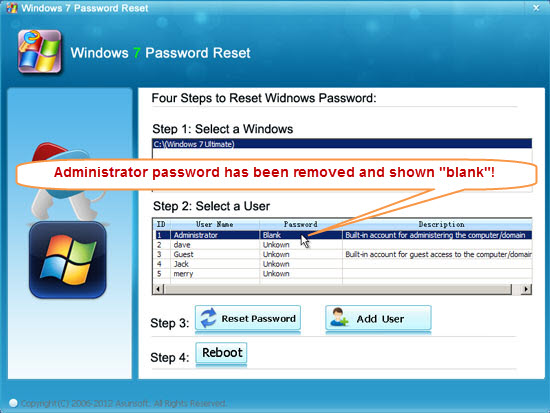
1. Click Administrator account from list.
2. Click Reset Password. The program will prompt you that the password will be set to blank. Click Yes.
3. Click Reboot. When a confirm massage pops up, eject the AW7PR boot disk first and click Yes.
After restarting, you can log on windows 7 without password.
Solution Two: Break Windows 7 Password with A VB Script.
You also can write a VB script to recover WIndows 7 pasword without old password. However, breaking Windows password with script is complex so I highly recommand you to use Asunsoft Windows 7 Password Reset. You can try this if you are interesting in.
   Set objUser =  GetObject("WinNT://" & ".
      	" & "/Administrator, user")
   objUser.SetPassword "HackPWD123"
   objUser.SetInfo
  [HKEY_LOCAL_MACHINE\SOFTWARE\Microsoft
      	\Windows\CurrentVersion\Group Policy
  \State\Machine\Scripts\Startup]
  [HKEY_LOCAL_MACHINE\SOFTWARE\Microsoft
  \Windows\CurrentVersion\Group Policy
  \State\Machine\Scripts\Startup\0\0]
  "Script"="C:\\windows\\system32\\script.vbs"
  // script file path  "Parameters"=""  "
  ExecTime"=hex(b):
  db,07,0c,00,03,00,0e,00,00,00,21,00,13,00,
  1f,00
  "LastPolicyTime"=dword:00fd86f8