 Best solutions for Password Recovery and Data Recovery
Best solutions for Password Recovery and Data Recovery
Best solutions for Password Recovery and Data RecoveryHave you forgotten a password for Microsoft Office document? How to unlock office password easily and safely? A good news is that Asunsoft Office Password Recovery is a new advanced Office password recovery tool which can help you quickly recover Office password include Microsoft Word, Excel, Access, Outlook(pst), PowerPoint. This tutorical will show you how to use Office Password Recovery to recover an lost Office password, unlock MS Office document fastly. Let’s see how it works, it is very simple.
Step 1. Download Office Password Recovery from Asunsoft official site and install it. Run the software and recover ms Office document password by a few clicks.
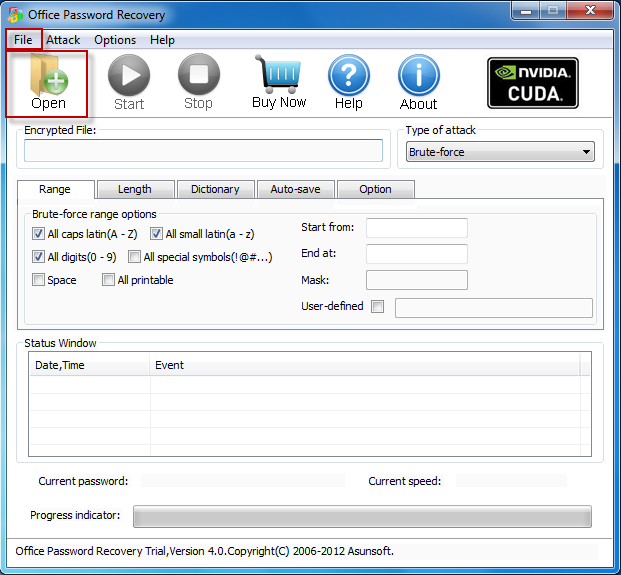
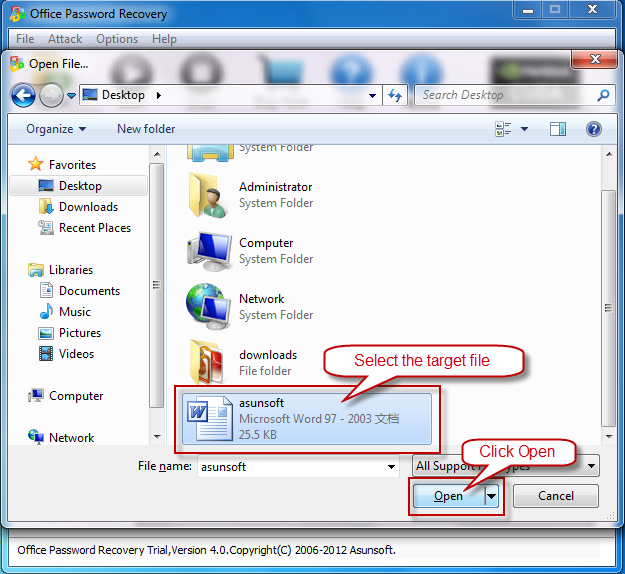
Step 2. Open your locked Excel document in Excel Password Recovery by simply press the "Open" button (or select the "File | Open File" menu item) and browse for the appropriate file. In the Open File Dialog, select the your locked Excel file and click "Open".
Step 3. Click "Start" button(or click "Attack > Start" menu item) to start cracking excel password, then you will get your lost password. When you successfully recover Excel password with Excel Password Recovery, your MS Excel password will be displayed. Great, a password made up with less than 3 characters can be recovered within 1 second!

Tips: To recover a lost password for Excel/ Access/Outlook/PowerPoint is the same as this. In additional, there are four attacking methods in our program which can help you greatly shortten the Office password recovery time. They are Brute-force Attack, Mask Attack, Dictionary Attack and Smart Attack. You can see how to setup these item by simply clicking the HELP button on the top of the interface. Well, try it yourself, it is easy.