Windows Password Reset
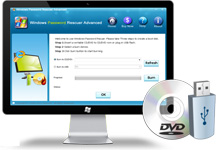
Asunsoft Windows Password Reset is one of the most popular Windows password recovery tools which can reset Windows local and domain administrator/user password for Windows 8/7/Vista/XP/NT/2008/2003 and 2000. Besides, you can use it to create a new Administrator account easily without logining that is a new way to unlock Windows password without data lost. Help you regain access to Windows system within a few minutes by burning a bootable CD/DVD or USB flash drive.
Windows Password Resset has 3 editions. Please select the right edition to reset your Windows password. Unlock your computer by yourself. 100% secure and 100% recovery rate.
- 3 Editions of Windows Password Reset Comparison for Three Editions >>
-
- Personal Edition Learn More

$17.95- Reset Windows 7/Vista/XP/2000 local admin and other users' password by using CD/DVD or USB flash drive. Creating new Administrator account without logining!


-
- Professional Edition Learn More

$27.95- Reset local admin and other users' password for Windows 7, Vista, XP, NT, 2000 2003, 2008. Supports run from CD/DVD or USB. Creating new Admin account without logining.


-
- Advanced Edition Learn More

$45.95- A powerful software which can reset all Windows local and domain passwords! Supports run from CD/DVD or USB. Creating new Administrator account without logining.


Overview:
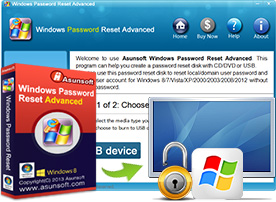
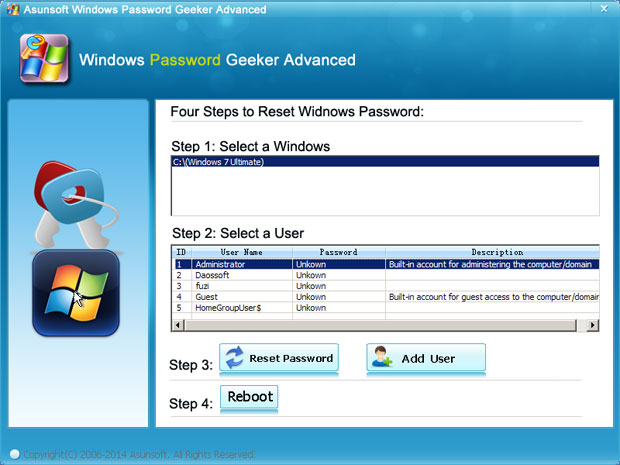
Asunsoft Windows Password Reset Tool Screenshot

Professional Windows Password Recovery Tool - Recover All Windows Password
- Reset local Administrator and other users' password for Windows 8, Windows 7/Vista/XP/NT, Windows Server 2008/2003/2000.
- Reset Domain Administrator and other Domain users' password for Windows 8, Windows 7/Vista/XP/NT, Windows Server 2008/2003/2000 on Server Computer.
- Create a new Administrator account to Windows without logining.

- Reset/Remove Windows password safely without lossing data.
- Reset Windows password of all computer including desktop and laptop auch as Dell, HP, Acer, Toshiba, Samsung, Sony, Asus, IBM, Lenove...

Convenient in Use - Reset Windows Password with CD/DVD or USB Flash Drive
- Support running from CD and DVD. Creating a Windows password recovery disk by burning a bootable CD/DVD.
- Support running from USB flash drive. Creating a Windows password recovery disk by burning a bootable USB flash drive. This is convenient because of its small size and simple usage.

Support Run on All Windows Operating Systems
- Support Windows 8, 7, Vista, XP, 2000, NT, etc.
- Support Windows Sever 2008, 2003(R2), 2000, etc.
- Support SATA, SCSI, IDE hard disk and RAID.
- Support Windows Operating System x32bit and x64bit

3 Simple Steps to Reset/Remove Your Windows Password
- Step 1: Download and install Windows Password Reset on any accessible computer.
- Step 2: Run it to create a Windows password recovery disk by burning it to CD/DVD or USB flash drive.
- Step 3: Insert the recovery disk to your locked computer, reset whichever user's password.

| Features | Personal | Professional | Advanced |
| Reset Windows 7/Vista/XP/2000 administrator password | ![]() |
![]() |
![]() |
| Reset Windows 7/Vista/XP/2000 other local users password | ![]() |
![]() |
![]() |
| Reset Windows Server 2008/2003/2000/NT local password | ![]() |
![]() |
![]() |
| Reset Windows Domain administrator/user password | ![]() |
![]() |
![]() |
| Reset Windows 8 administrator password | ![]() |
![]() |
![]() |
Create a new Administrator account ![]() |
![]() |
![]() |
![]() |
| Create a password recovery CD/DVD disk | ![]() |
![]() |
![]() |
| Create a password recovery USB flash drive | ![]() |
![]() |
![]() |
| Support Windows 8/7/Vista/XP/NT | ![]() |
![]() |
![]() |
| Support Windows Server 2008(R2)/2003(R2)/2000 | ![]() |
![]() |
![]() |
| Price | $17.95 | $27.95 | $45.95 |
| Purchase | ![]() |
![]() |
![]() |
| Download | ![]() |
![]() |
![]() |
| How to use | User Guide | User Guide | User Guide |